
Stop wasting your money on subscription-based productivity suites that promise to “revolutionize” your life but really just add more digital clutter to your mental load. I see it every week: professionals drowning in complex, feature-heavy software, thinking they just need one more notification or a prettier interface to finally get things done. The truth is, most of these tools are just distractions in disguise. You don’t need a high-priced ecosystem to manage your life; you need a way to visualize your flow. That’s where a stripped-back personal kanban system comes in—not as a complex digital puzzle, but as a simple, visual way to see exactly what is on your plate and, more importantly, what isn’t.
I’m not here to sell you on a lifestyle brand or a complicated setup that requires a manual to understand. My goal is to show you how to use personal kanban to actually reclaim your focus by stripping away the noise. I’ll share the exact, low-friction frameworks I’ve used for decades to manage complex workflows, focusing on the systems that move the needle rather than the apps that just look good on a screen. Let’s get back to the work that actually matters.
Table of Contents
- Mastering Visual Workflow Optimization Without the Digital Noise
- Why Personal Task Tracking Systems Fail Most People
- Five Ways to Keep Your Kanban From Becoming Just Another Messy List
- The Bottom Line: Making Kanban Work for You
- The Core Philosophy
- Getting Out of Your Own Way
- Frequently Asked Questions
Mastering Visual Workflow Optimization Without the Digital Noise
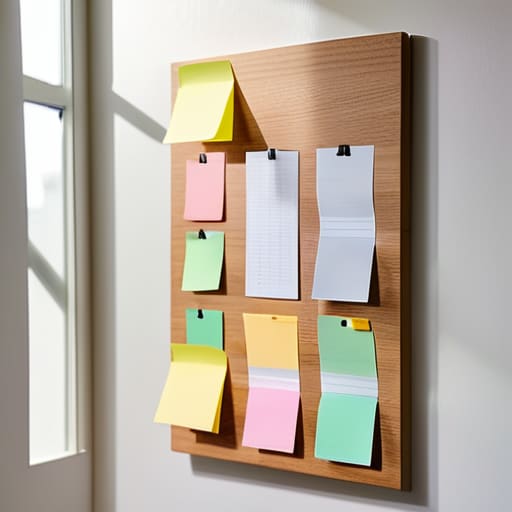
The trap most people fall into is thinking they need a complex software suite to manage their day. They spend more time configuring notifications than actually working. To achieve true visual workflow optimization, you need to strip things back to the essentials. Whether you use a physical whiteboard or a simple digital tool, the goal is to see your commitments at a glance. If you can’t see where your energy is leaking, you can’t fix it.
The real magic happens when you implement a strict rule for limiting work in progress. I see this constantly in my consulting work: people treat their to-do lists like an infinite buffet, grabbing everything in sight and leaving a trail of half-finished projects behind them. By capping the number of active tasks in your “Doing” column, you force yourself to actually finish one thing before starting the next. It’s not about doing more; it’s about reducing the mental friction caused by constant context switching. Stop trying to juggle ten balls and just focus on the one currently in your hands.
Why Personal Task Tracking Systems Fail Most People

Most people approach personal task tracking systems with the same mistake I saw constantly in the tech firms I used to consult for: they mistake activity for progress. You download a flashy new app, spend three hours color-coding categories, and feel a sense of accomplishment before you’ve actually done a single thing. This is the “productivity trap.” You aren’t managing work; you’re just curating a digital museum of things you haven’t finished yet.
The real reason these systems fail is a lack of boundaries. We treat our to-do lists like infinite wish lists rather than finite capacity models. Without a strict focus on limiting work in progress, your board just becomes a graveyard of half-started projects and abandoned ideas. When everything is a priority, nothing is. If your system doesn’t force you to stop starting and start finishing, it isn’t a tool—it’s just more digital noise that adds to your mental load instead of reducing it.
Five Ways to Keep Your Kanban From Becoming Just Another Messy List
- Limit your “Doing” column. If you have more than three tasks in progress, you aren’t working; you’re just juggling. Pick one thing, finish it, and move it to done before you even look at the next card.
- Keep the cards simple. Don’t turn your Kanban board into a dumping ground for every fleeting thought or “maybe one day” project. If it doesn’t require immediate action or a specific next step, keep it in a separate backlog or leave it out of the system entirely.
- Use physical cues when you can. While digital tools have their place, there is something about moving a physical sticky note across a board that grounds you. It makes the progress feel real, rather than just another notification on a screen.
- Define your “Done” clearly. A task isn’t finished just because you stopped thinking about it. Decide what “done” actually looks like for each item so you aren’t constantly pulling half-finished work back into your active column.
- Review and prune weekly. Every Friday afternoon, look at your board. If a card has been sitting in “In Progress” for two weeks, it’s either not a priority or it’s too big. Break it down or move it back to the backlog. Don’t let stale tasks clutter your mental space.
The Bottom Line: Making Kanban Work for You
Stop looking for the “perfect” app and start looking for the perfect flow; a system is only as good as your ability to see where your time is actually going.
Respect your WIP (Work in Progress) limits religiously, because a board full of “doing” tasks is just a glorified, stressful to-do list.
Use your board to visualize the bottlenecks, not just the wins, so you can stop reacting to fires and start managing your actual capacity.
The Core Philosophy
“A Kanban board isn’t a place to dump every fleeting thought or minor errand; it’s a visual boundary that protects your focus by showing you exactly how much you can actually handle today.”
Emmett Kowalski
Getting Out of Your Own Way
At the end of the day, personal Kanban isn’t about finding the perfect, most expensive software subscription; it’s about creating a visual boundary for your brain. We’ve talked about why complex systems fail and how to strip away the digital noise to focus on what actually moves the needle. Remember, the goal is to limit your work in progress so you aren’t constantly context-switching or drowning in a sea of half-finished tasks. If your board feels cluttered or overwhelming, it’s a sign that your system is working against you, not for you. Keep it lean, keep it visible, and stop over-engineering the process.
I spent years thinking that a more complicated dashboard would somehow make me more capable, but I was wrong. Real efficiency comes from the clarity of knowing exactly what needs your attention right now and, more importantly, what can wait. Use these boards to protect your time and your mental energy. When you finally stop chasing every new productivity trend and start mastering your own flow, you’ll find you have more than just a better workflow—you actually have room to breathe. Now, close the tabs, pick your top three tasks, and get to work.
Frequently Asked Questions
How do I know when I've actually hit my limit for "Work In Progress" without feeling like I'm stalling?
You know you’ve hit the limit when “switching costs” start eating your day. If you find yourself staring at a screen, paralyzed by three half-finished tasks, or constantly jumping between tabs without actually finishing anything, your WIP is too high. You aren’t stalling; you’re redlining. Stop adding new cards to “Doing.” Instead, force yourself to move one existing item to “Done” before you touch anything else. Focus is a finite resource—don’t spread it too thin.
Do I really need a fancy digital tool for this, or will a simple notebook and some sticky notes actually do the job?
Honestly? If a notebook and sticky notes get the job done, use them. I see people spend weeks configuring complex software only to end up more overwhelmed than when they started. The tool is secondary; the system is what matters. If you can see your workflow clearly on a physical board, you’ve already won. Don’t let the search for the “perfect” app become another form of procrastination. Keep it simple and keep moving.
How do I handle those unexpected "emergency" tasks that constantly blow up my existing board?
The “emergency” task is usually just a distraction in disguise, but I get it—sometimes things actually catch fire. Don’t just shove them into your “Doing” column; that’s how you lose the thread of your actual work. Create a dedicated “Triage” lane. Evaluate the fire: if it’s truly urgent, swap it with a current task. If it isn’t, it stays in Triage until your next planning session. Protect your flow.
